

| |
Freeware |
Standard |
Pro |
| General |
|
|
|
| Runs on Windows 98, ME, NT, 2000, XP and 2003, 2008, Vista, Windows 7. |
|
|
|
| Customizable graph column widths. |
|
|
|
| Can copy and paste graph image into other applications (MS Word, Photoshop, etc.). |
|
|
|
| Can "Send email..." with image or data to automatically start an email including pertinent info. |
|
|
|
| Can schedule automatic saves of images and data. |
|
|
|
| Minimizes to tool tray to unclutter the task bar during long-term monitoring sessions. |
|
|
|
| Runs as a native Windows Service (ie: can start tracing on boot). |
|
|
|
| Core Functionality |
|
|
|
| IP Address to name lookups (DNS) happen in a separate thread from traces. |
|
|
|
| Route change functionality tracks current route even if route changes during specific trace. |
|
|
|
| Low resource usage, high performance multi-threaded trace engine. |
|
|
|
| Ability to save images directly to file in .BMP, .GIF, or .PNG formats. |
|
|
|
| Can schedule automatic saves of images. |
|
|
|
| Ability to trace using UDP (Unix-style) and TCP (using HTTP, FTP, DNS or other TCP port) packets in addition to standard ICMP protocol. |
|
|
|
| Ability to adjust graph scaling to account for conditions where one hop reports extremely bad times, or in the case of long-term monitoring projects with really bad data that skews the graph. |
|
|
|
| Configurable limit to specify how much data to keep in memory. Allows unlimited length monitoring sessions. |
|
|
|
| Ability to "ping" only the final destination to lessen traffic generated. |
|
|
|
| Can define and save workspaces for easy loading of groups of targets (and position of the user interface) to make resuming of sessions easier. |
|
|
|
| Remote viewing of active targets and ability to change target settings via web interface. Uses built-in web server or Microsoft IIS. |
|
|
|
| Customizable packet options including size, contents, timeout period and "burst rate". |
|
|
|
| Support for QoS enabled networks via capability to modify packet header byte. |
|
|
|
| Define named configurations (collections of settings) for easy switching and selecting when tracing to a target. |
|
|
|
| Monitoring |
|
|
|
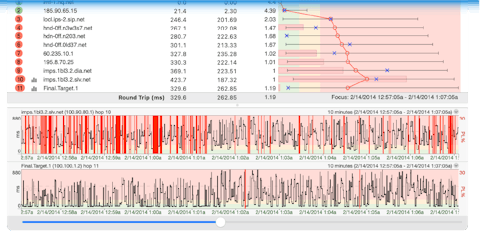
| Intuitive graphical display shows route, hosts, packet loss percentage and latencies. |
|
|
|
| Shows min/max response times for range. |
|
|
|
| Ability to save collected data so you can continue tracing that session later. |
|
|
|
| Graphs any host over time, including packet loss and latency. |
|
|
|
| Ability to scroll back and forth over time and zoom in on any specific time period to find out where problems occur...or where they didn't occur. |
|
|
|
| Built-in Whois so Internic servers can be queried by name, or ARIN servers by address to see who owns and runs a particular IP address. |
|
|
|
| Trace to multiple targets in a single instance. |
|
|
|
| Show Jitter, Standard Deviation and MOS |
|
|
|
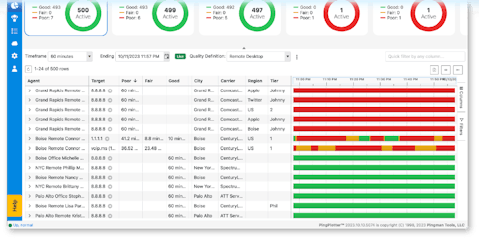
| Displays all targets in an easy to read Summary section. |
|
|
|
| Extensive alerting capability. Alerts will allow you to set parameters where you want to be notified of the condition. If the condition(s) fire an alert, you can log that data to a text file, send an email with the pertinent information included or choose from numerous other notification types. |
|
|
|
| Troubleshooting |
|
|
|
| Can save collected data for later analysis or reference. |
|
|
|
| VoIP specific values like Jitter graphed for each hop in route to aid in VoIP troubleshooting. |
|
|
|
| Comments can be tagged onto history graph to record known conditions or notes. |
|
|
|
| Exports any portion of collected data to a text file for analysis by other software packages, i.e. Microsoft Excel, Open Office, etc. |
|
|
|
| Packet loss percentages shown on route graph and lower history graph. |
|
|
|
| Can have remote script trace back to you as well as you tracing to that target so you can see route to target and return route from target. |
|
|
|
| Extensibility |
|
|
|
| Built-in script engine for extended functionality, definition of custom measurements, etc. |
|
|
|
| Pricing |
Free |
|
|