

About PingPlotter Sharing

Sometimes solving your network problem is made easier by enlisting the help of a friend, a professional, or an online community. PingPlotter provides an incredibly easy way to get help with it's one-step share feature.
Here's how it works:
Using the share feature creates a private webpage in the cloud for the results of your PingPlotter test. The page shows a screenshot based on what the program looked like when you clicked share and provides a downloadable file containing up to 24 hours of PingPlotter results.
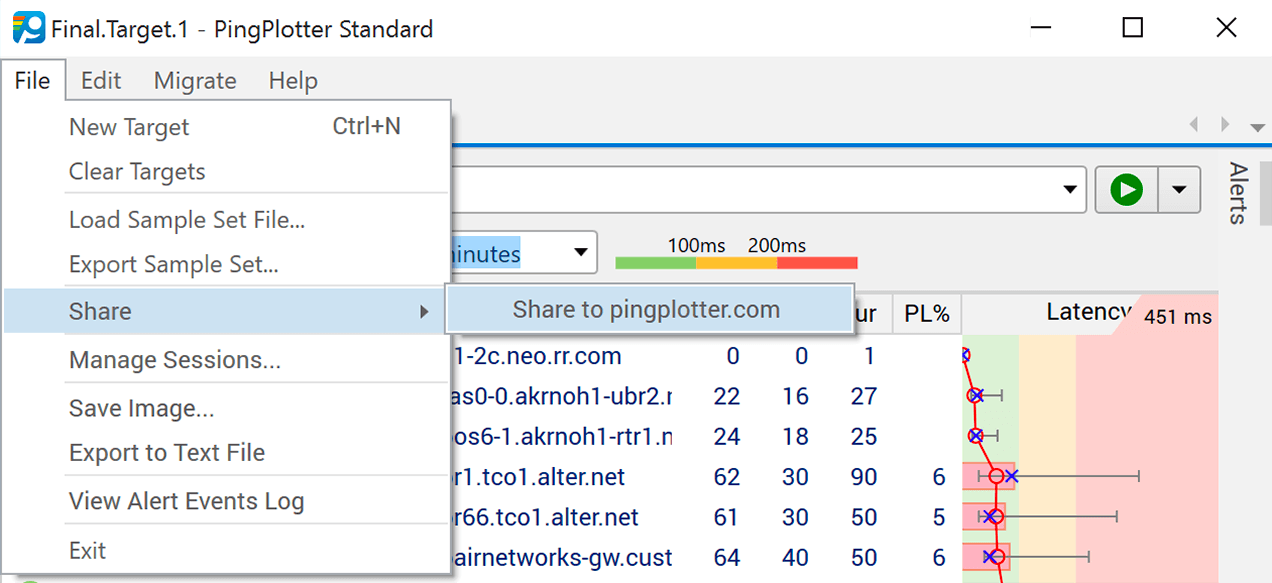
To publish your PingPlotter results, select Share from the File menu and click Create Share Page. It's that easy! PingPlotter will do all the work of generating /themes/pingman/images/article, exporting data and publishing your page to PingPlotter.com.
After publishing, share pages open automatically in your web browser. Your page can then be viewed by anyone you provide with the page's the unique code. From your page, enlisting help is simple with links for posting to sites like Facebook and Reddit plus options to copy the link, or share it by email.
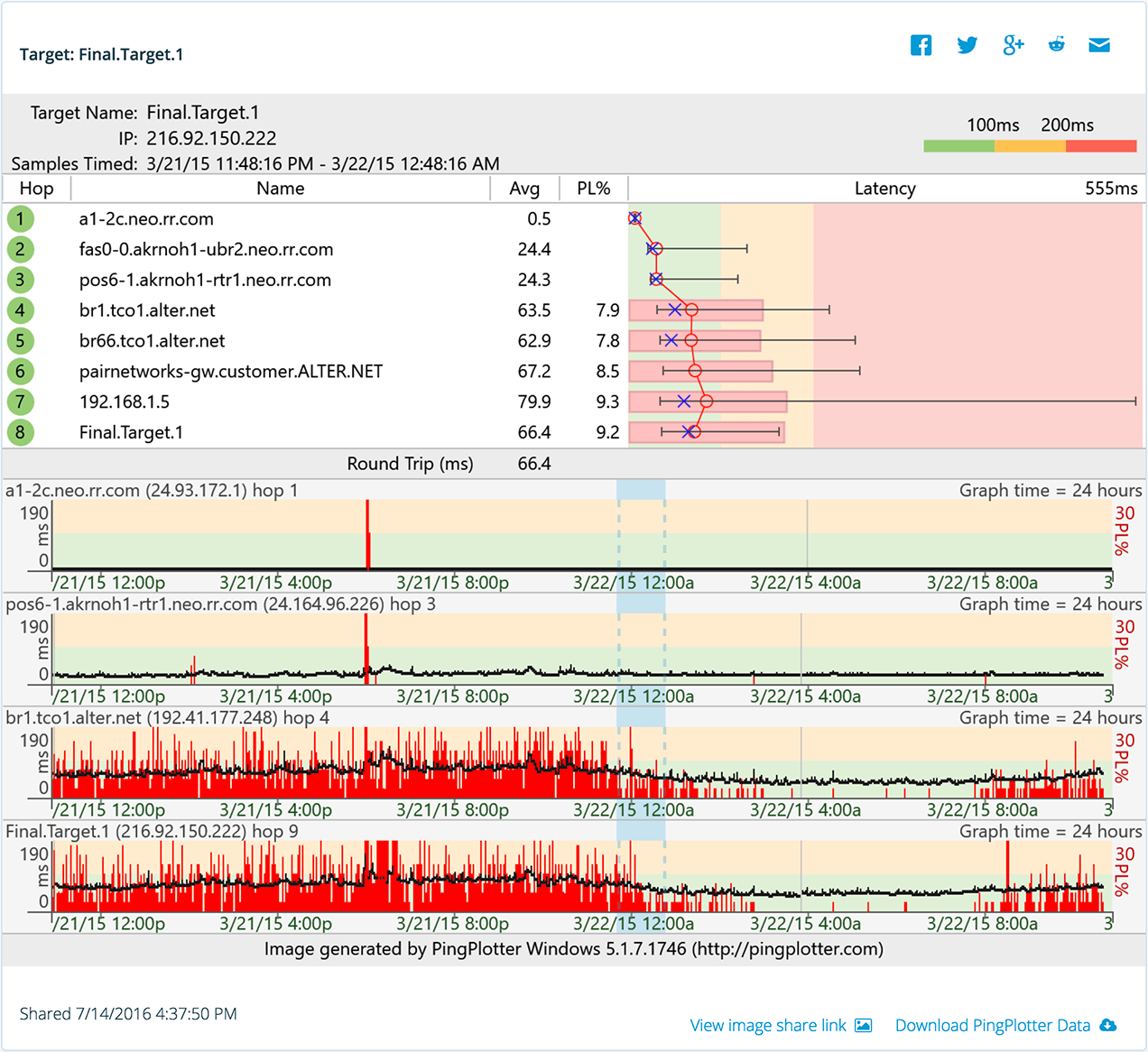
When you give someone a link to your share page, you provide them with the information needed to help you with your network problem as well as access to Pingman Tools' library of troubleshooting knowledge and resources. The share page lets them see your screenshot or download the data you collected. They can also download their own copy of PingPlotter from the page. Provided, of course, they don't already have it. It is pretty sweet software after all.
Happy sharing!
Who will see my data?
When you create a private share page on pingplotter.com you receive a unique link that is a key to viewing your shared data. The pages you share are not part of a public directory and are not indexed by search engines. This enables you to share your data to only the people you wish give your private share code and no one else. You can share it with a single person or post it online for anyone to view. It's up to you.
Can my shared data be opened in PingPlotter Free?
Yes and no. PingPlotter Free users can share data freely and open their own shared data files. For others to open and view your shared data, they will need to have an active trial or licensed version of PingPlotter Standard or Professional. It is not necessary to have PingPlotter to view a share page or screenshot. This restriction is only for downloading the sample data and opening it on their own computer.
What if I forgot to save the link?
There is no method for you to search for or recover a lost share code. You have the ability to see your most recent share pages in PingPlotter, but if you create a significant number of share pages, you will want to copy your share codes to a more permanent location.
Our view on privacy
Your privacy is critically important to us. We recommend reviewing your share page before distributing the link to ensure that you are comfortable with the information that you are giving to others. For more information see our privacy policy.
Tagged as: Article , Using pingplotter
-
Guides
- A Small Business Guide to Incorporating a VoIP System
- VoIP Troubleshooting Guide
- How to Troubleshoot Microsoft Teams
- How to Troubleshoot Slack
- How to Troubleshoot Zoom
- Proving Your Internet Was Down
- How to Keep a Record of Network Performance Over Time
- How to Manage a Contact Center Team Using PingPlotter
- Rethinking Internet Health Beyond Speed Tests
- Hire Smarter with NetCheck
- Setting Internet KPIs and Standards for Business Success in 2026
- Is Your Contact Center Truly Ready for Work-From-Home?
-
PingPlotter 101
- A Beginner's Guide To Anomaly Detection and its Role in the Network
- How to See All of Your Internet Connections in One Place
- How Many Traces Do I Actually Need?
- How to Use Distributed Network Monitoring
- The Scoop on Quality Score Definitions
- The Hidden Costs of Remote Network Downtime (And How to Stop Them)
- The Magic of LiveShare
-
Troubleshooting Tips
- How to Solve Common VoIP Issues
- What to Do Router Isn't Working After Reset
- Find The Device Slowing Down Your Network
- How to Optimize Remote Work Team Communication With VoIP
- Maximize Profits by Optimizing Your Service Team
- For Solving Wireless Network Problems, Knowledge is Power
- A Broadcast Storm Defined & How to Fix It
- And the Best Ping Tool is...
- New to Remote Management? Here's How to Keep Everyone Online
- Troubleshooting in the Time of COVID-19
- When supporting remote teams, are RMMs really the best fit?
- What IT Can Learn From the Cloud-Connected Firm
- Breaking Down Silos
- 5 Things Businesses Get Wrong About Remote Internet (And How to Fix Them)
- When Remote Internet Undermines your Agents, Everyone Loses
- Turn Uncertainty Into Authority
-
Interpreting Data
- The Reviews are In: Mean Opinion Score is More Than a Rating
- Running A Bandwidth Saturation Test
- Why One Ping Only Tells Part of the Story
- Reheating a Router: Is the Microwave Cooking Your WiFi?
- Differences Between TCP, UDP, and ICMP
- What Are Good Latency & Ping Speeds?
- Is PingPlotter Safe?
- The Difference Between Latency & Packet Loss
- Why Perspective Matters for Network Testing
- Bandwidth vs Latency — 4 Vital Differences
-
Using PingPlotter
- About PingPlotter Sharing
- Learn How to Use Pingplotter for Games
- How to Find Devices on Your Network with Network Discovery
- Find the IP Address of any IoT Device
- Troubleshoot Your Way with Flex Storage and Final Hop Only
- Getting Help with PingPlotter Share Pages
- Helping with PingPlotter Share Pages
- How to Deploy PingPlotter Wherever You Need
- For Service Providers, it Pays to be Proactive
- Mobile & Desktop Collaboration Tips
- Make Troubleshooting a Picnic with NIC Selection
- PingPlotter's Web Interface Takes Your Network to the Net
- Network Route Changes Can Lead to Payday — or Peril
- Stay on Top of Trouble with PingPlotter Alerts
- Founder's Perspective on PingPlotter 5
- Cut Through Confusion With PingPlotter Reports
- Be the hero with PingPlotter Sidekick
- Team up with PingPlotter's All-Hands update
- Plot a course with Quick Links
- Introducing PingPlotter Cloud
- Up your accuracy with the latest PingPlotter update
- Leave the app behind with PingPlotter's web UI
- An important PingPlotter update
- Get a head start with PingPlotter Cloud’s Agent presets
- What Legal IT Can Learn From the Cloud-Connected Firm
- Assisted Network Troubleshooting with PingPlotter Insights
- Instant Feedback Empowers You to React Within Seconds
- End-User Takes Center Stage in New PingPlotter Release
- PingPlotter Cloud’s New Dashboard — Widgets that Work
- Remote Agent Internet Impacts your Contact Center's CX and Profitability
- How to Pre-Qualify Remote New-Hire Networks
- Enhancing Operational Efficiency with PingPlotter Cloud's Updated Alerts
- PingPlotter’s Quick Guide to Customer Contact Week
- Navigating the Intersection of AI, Connectivity, and Hiring Reliability
- The Role of Remote Internet Monitoring in Credit Union Contact Centers
- Remote Work Challenges in Credit Union Contact Centers — Overcoming Obstacles
- Trends and Insights in the Contact Center Landscape
Test remote worker internet
PingPlotter Cloud helps solve network problems for other people.
PingPlotter CloudTest your own internet
PingPlotter Standard & Professional help solve problems on your own network.
Try PingPlotter