

PingPlotter 5.27 Drops — Big Performance Gains, Smarter Tools, One Unified Experience

Key Takeaways
- PingPlotter 5.27 is rebuilt on .NET 10 LTS with a modern UI framework for faster performance and smoother visuals.
- Native Apple Silicon support delivers better speed and battery life on M1 through M5 Macs.
- Full Mac and Windows parity means features and fixes arrive on both platforms at the same time.
- New interactive tools like Focus Overlay and Precision Scrubbing make data exploration easier.
We’ve been obsessing over the little things lately.
Not flashy things. The everyday things. How quickly the app starts. How smooth graphs feel when you zoom around. Whether switching from Windows to Mac forces your brain to recalibrate for no reason.
PingPlotter 5.27 is the result of all that polishing: faster, cleaner, and more consistent everywhere you use it.
Internet troubleshooting is already hard enough when networks, providers, and users are all pulling you in different directions. The tools should help you move faster, stay oriented, and keep people connected without getting in your way. That’s why a huge part of 5.27 is about making that experience feel seamless.
A modern foundation
Under the hood, PingPlotter has been rebuilt on a modern foundation using .NET 10 LTS and the Avalonia UI framework. In real-world terms, that means faster startup, smoother performance, sharper visuals, and a much better experience on modern high-DPI displays.
Mac users are getting some especially nice upgrades this round. PingPlotter now runs natively on Apple Silicon, from M1 through M5. No translation layers. No extra overhead. Just better performance, improved responsiveness, and longer battery life.
TCP traceroute has also arrived on Mac, which means diagnosing networks that block ICMP no longer requires switching over to Windows or reaching for another machine.
One of the biggest themes in 5.27 is unity across platforms. Mac and Windows now share the same UI library, bringing the two experiences closer together than ever. When you switch between macOS and Windows, it feels like the same PingPlotter. Your layouts, workflows, and everyday interactions stay familiar no matter where you’re working.
It also means improvements land everywhere faster. New features, fixes, and interface updates no longer feel split between platforms or staggered across releases.
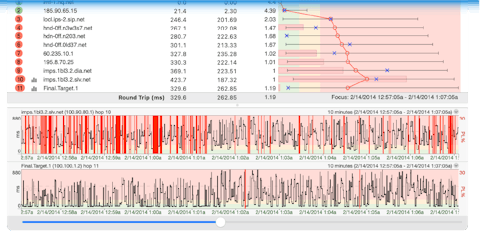
Working with your data feels better too. The Focus Overlay now has improved resizing controls, making it easier to adjust the visible time range directly from the graph. And the new Precision Scrubbing feature is inspired by the kind of fine-control scrubbing you see in modern video players and editing tools.
Windows users also get a fully adjustable latency legend with simple drag controls for fine-tuning thresholds visually. Mac users might notice a familiar feature there. They got it first.
Searching trace data is much faster now too. Hit Ctrl+F or Cmd+F and results appear instantly inside the grid, complete with live match counts and automatic scrolling.
Quieter, calmer, less in your way
A lot of the best improvements in 5.27 are the kind you start appreciating after a few days of real use. Unresponsive hops can fade away automatically to keep route views cleaner. Long tracing sessions can keep your machine awake without extra utilities or workarounds. Notifications feel lighter and more modern, with native macOS alerts and streamlined popups replacing old blocking dialogs.
None of those changes sound huge on their own. Together, though, they make PingPlotter feel calmer, quicker, and easier to live in during long troubleshooting sessions. Less friction. Less interruption. More focus on the people and connections you’re trying to support.
Mac users also now get a full email template editor with live preview and drag-and-drop variables for building polished alerts quickly. Windows users will notice a redesigned installer that is cleaner, simpler, and easier to navigate.
And then there are all the little quality-of-life improvements that quietly make your day better:
- Copy individual cells instead of entire rows
- Export traceroute-style text in seconds
- Crisper jitter graphs
- Smoother animations
- More natural keyboard shortcuts
- A more adaptable interface in tighter layouts
- Clearer help links
- More reliable DNS handling
- Streamlined installation dialogs on Mac
So how do you get all this goodness?
If you’re using PingPlotter Pro or Standard, just download and install version 5.27 and you’re off to the races.
This is the fastest, cleanest, and most unified version of PingPlotter we’ve ever shipped. More importantly, it’s built to help you troubleshoot faster, collaborate more easily, and build stronger connections with the people who rely on you when networks go sideways.
Go fire it up and take it for a spin.
Download PingPlotter 5.27One quick compatibility note
PingPlotter 5.27 requires Windows 10 or later and macOS 12 Monterey or later. Using an older system? PingPlotter 5.25 is still available.