

The Ghosts in Your Network: Why Problems Keep Coming Back

Your network has a few skeletons in its closet.
Key Takeaways
- A network can appear perfectly healthy while trouble is brewing. Intermittent packet loss, latency spikes, and unstable connections don't always trigger outages or obvious warnings.
- A successful speed test only tells part of the story. It measures performance at a particular moment, not what happened earlier or what might happen later.
- Network problems often leave clues. Recurring slowdowns, time-of-day patterns, and shared trouble spots can help you anticipate when and where issues may return.
- Continuous monitoring is the closest thing to a network crystal ball. It can't predict the future, but historical data can reveal patterns that one-time tests miss.
- The goal isn't to prevent every problem. It's to recognize warning signs, investigate recurring issues, and respond with evidence instead of guesswork.
Every October, we're reminded that people have an enduring fascination with knowing what comes next. Crystal balls, tarot cards, fortune tellers, and suspiciously specific horoscopes all promise some glimpse of the future. Whether you believe in any of that is your business, but there's something undeniably appealing about knowing trouble is coming before it arrives.
Now imagine having that ability with your network.
You could know that your internet connection is going to start dropping packets at 2:15 tomorrow afternoon, that your video meeting will freeze during the most important presentation of the week, or that the office network will mysteriously slow to a crawl just as everyone returns from lunch. You might even have time to do something about it.
Unfortunately, no networking tool can tell you the future with that kind of certainty. But here's something interesting: network problems are often less random than they appear. They may follow recurring patterns, show early signs of deterioration, or share characteristics with previous incidents. The clues are there, provided you've been paying attention.
And that's where things get interesting. While you can't predict every network problem, you can sometimes recognize the conditions that make another one more likely.
The most convincing disguise? A perfectly healthy network.
In horror movies, the audience usually knows something terrible is about to happen long before the characters do. The house looks normal, the neighborhood is quiet, and everyone seems perfectly content to ignore the increasingly suspicious noises coming from the basement.
Networks have a similar talent for appearing innocent. Your internet connection is working. Your applications are online. Your video call connected successfully, and your speed test reports numbers that would make your ISP's marketing department proud. By every obvious measure, everything seems fine.
Yet a healthy-looking network isn't necessarily a healthy-performing network.
Here's what we mean: Consider a connection that experiences brief periods of packet loss throughout the day. Most of the time, web browsing feels normal and applications continue running. Then a video call freezes, a game stutters, a file transfer stalls, or a remote employee loses access to a business application for a few seconds.
Nothing went completely offline, so the problem may never appear on a conventional availability dashboard. And by the time someone investigates, the connection has returned to normal.
That's the trouble with intermittent network problems. They don't always leave a dramatic trail of destruction, and they rarely have the courtesy to stick around until IT arrives.
Spoiler alert: Your speed test can't see ghosts
When something goes wrong with a connection, one of the first things people do is run a speed test. It's understandable. Speed tests are easy, familiar, and provide useful information about how much bandwidth a connection can deliver at that moment.
The problem is the phrase at that moment.
Imagine hearing a strange noise in your house at midnight, then checking the basement at breakfast and declaring the whole thing a false alarm because everything looks fine. Maybe you're right. Or maybe whatever made the noise simply isn't there anymore. (Unsettling thought, isn't it?)
A speed test works a little like that. It captures a snapshot of your connection's performance, but it doesn't tell you what happened ten minutes earlier or whether the same problem has been occurring every afternoon for the past month.
It also doesn't necessarily reveal the kinds of instability that affect real-time applications. A connection can have excellent download speeds while experiencing packet loss, where some data fails to reach its destination, or latency, the delay it takes data to travel across the network. Variations in that delay, known as jitter, can make voice calls, video meetings, and online gaming feel unpredictable.
That's why a connection can be fast without being particularly reliable. And if your troubleshooting strategy consists entirely of testing a connection after something goes wrong, you may spend an impressive amount of time proving that the problem is no longer happening.
The future has a habit of repeating itself
Here's where our crystal ball starts to become a little more useful. Many connectivity problems aren't isolated events. They repeat, sometimes with enough consistency that you can begin to recognize a pattern.
Perhaps your home connection develops packet loss around the same time every evening. Maybe an office experiences increased latency whenever a particular workload begins. Or perhaps several remote employees using the same ISP encounter similar problems during peak hours.
Viewed individually, each incident might look like another random network annoyance. Viewed over several days or weeks, those incidents may tell a different story.
This is the real value of network history. Instead of asking what your connection looks like right now, you can start asking what it tends to do over time. Does performance deteriorate at particular hours? Does packet loss consistently begin at the same point along the network route? Are several devices or locations experiencing similar behavior? Did the problem begin after a change to your network or a new application rollout?
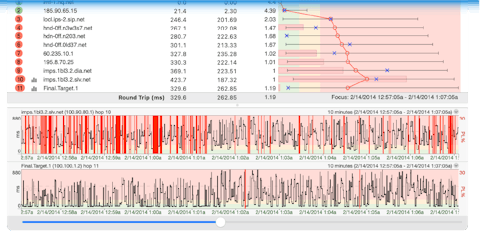
Those questions won't produce supernatural revelations, but they can help narrow the possibilities considerably. For example, suppose PingPlotter shows that latency has increased along the same network path every weekday afternoon for the past two weeks. You can't confidently declare that the problem will happen again tomorrow, and the pattern alone doesn't establish its cause. But you now have a reason to investigate that time period, compare other connections, and look for contributing factors.
That's a considerably better position than waiting for the next complaint and starting from scratch.
What your network is trying to tell you
The trick to recognizing recurring problems is knowing which clues deserve your attention. A few are particularly useful:
- Packet loss that appears repeatedly. Occasional lost responses from an intermediate router don't necessarily indicate a problem, since some routers deprioritize diagnostic traffic. But packet loss that continues through subsequent hops and affects the destination can be a sign worth investigating, particularly when it coincides with application trouble.
- Latency that changes at predictable times. A connection that performs well in the morning but consistently slows down later in the day may be experiencing congestion or another recurring condition. Looking at when the change begins can help identify where to investigate.
- Problems shared by multiple devices or locations. If one computer experiences trouble, the cause may be local. If several devices encounter similar problems at the same time, their shared network infrastructure becomes an important place to look.
- Changes in the network route. Internet traffic doesn't always follow the same path. Routes can change as providers adjust how traffic moves between networks. A route change isn't automatically bad, but comparing it with changes in latency or packet loss can provide useful context.
- Brief problems that never become outages. Some of the most frustrating network issues last only seconds. They may be too short to trigger an obvious alarm but long enough to interrupt a call, disconnect a session, or disrupt an application.
Individually, these clues may not tell you much. Together, and especially when viewed over time, they can help reveal a pattern that would otherwise remain hidden.
No crystal ball required, only continuous monitoring
Instead of waiting until a problem appears and then beginning a test, PingPlotter continuously measures network performance (as often as every 2.5 seconds) and preserves the results. That gives you a record of what happened before, during, and after an incident, even if everything looks normal by the time you start investigating.
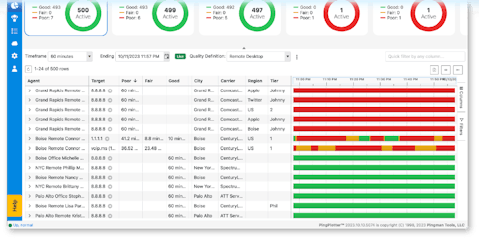
For someone troubleshooting a home internet connection, that might mean discovering that packet loss occurs several evenings a week. For an IT team, it could mean recognizing that connectivity problems across multiple offices share a common network path. For a managed service provider, it might reveal recurring performance issues affecting a client's connection before those problems turn into another support ticket.
And for organizations supporting remote employees, it can help distinguish between trouble on a local network, an ISP connection, or somewhere farther along the route.
The value isn't limited to explaining yesterday's problems. Historical patterns can also help teams make more informed decisions about what to investigate next, when to investigate it, and whether an issue deserves attention before it becomes more disruptive.
With appropriate monitoring and alerts, you can also be notified when performance crosses a threshold instead of relying on someone to notice a problem and report it.
None of this guarantees that you'll catch every issue before users are affected. Networks are complicated, and some failures really do arrive without warning. But monitoring gives you a better chance of recognizing deterioration and recurring behavior before the next incident catches everyone by surprise.
Something wicked this way pings
There's a moment in almost every horror movie when someone discovers that all the strange events they've been dismissing were connected. The flickering lights, the unexplained noises, the door that keeps opening on its own. Suddenly, the clues make sense.
Network troubleshooting can have a similar moment, although hopefully with fewer people running through the woods while screaming.
The connection problems that seemed random may have been occurring at predictable times. The isolated complaints may have shared a common network route. The mysterious slowdowns may have started after a particular change. What looked like a collection of unrelated incidents turns out to have a pattern.
Of course, recognizing a pattern doesn't automatically solve the problem. You still need to investigate the evidence, determine what's causing the behavior, and decide what to do about it. But you no longer have to begin every investigation with a blank slate.
That's a critical shift in how we think about network monitoring. It's a way to understand how your network behaves, recognize when that behavior changes, and identify recurring trouble before it becomes another mystery.
The future isn't written, but the past leaves clues
If you're hoping for a magical way to predict every dropped connection, latency spike, or internet outage, we're afraid we have some disappointing news. Even after nearly 30 years of helping people troubleshoot networks, we haven't found a reliable crystal ball.
What we have found is that the past can tell you quite a bit about what deserves your attention next. A network's history can reveal patterns that a quick test misses, provide context for intermittent problems, and help you make more informed decisions about where to investigate. It won't eliminate uncertainty, but it can make the next unexpected problem considerably less mysterious.
Stop guessing. Start seeing what's coming.
Network problems don't have to catch you off guard. PingPlotter gives you the visibility to spot recurring issues, uncover their causes, and take action before they become bigger headaches. Ready to take the mystery out of your network? Let's talk about the right solution for you.
See How It Works